
Choose language

Invoice Processing

Take control of your invoices

Invoices get lost, encoding takes time, and payments are delayed. Elari automates invoice processing from receipt to payment, using scan-and-recognition software and automatic approval.
Elari_Invoice_Processing_header-1

Choose automatic invoice processing

With Elari's invoice processing software, you can prevent lost invoices, error-prone data entry, and late payments to suppliers.
  • keyboard

    Faster Coding

    OCR and Autosuggest automatically recognize and code invoices based on previously entered data.
  • approve

    Automated Approval Workflow

    Elari automatically sends each invoice to the appropriate approver and splits invoice lines if multiple budget managers need to approve them.
  • icon-query_stats

    Real-time insight into obligations

    With our analysis, you can view the status of each invoice in real time and stay on top of outstanding obligations.
  • check

    PEPPOL, XML, and 3-way matching

    Elari integrates with PEPPOL for XML invoices and uses 3-way matching: if a match is found, the invoice is automatically approved.
Elari_productimage_card_02png

Everything you need for a completely touchless process.

Combine Invoice Processing with Procurement and Contract Management for 3-way matching and a fully touchless process, from order to payment.

Elari Purchase to Pay consists of multiple modules that you can deploy flexibly, depending on your process. With three package levels, you can choose exactly what fits your organization: integrate a single module, or work with multiple modules in a fully integrated manner, all within a single platform.

Digital Invoice Processing: How Does It Work?

The invoice arrives, Elari enters the details and prepares the encoding. You review, approve, and pay.
1-Elari Invoice Processing: Receiving and Coding

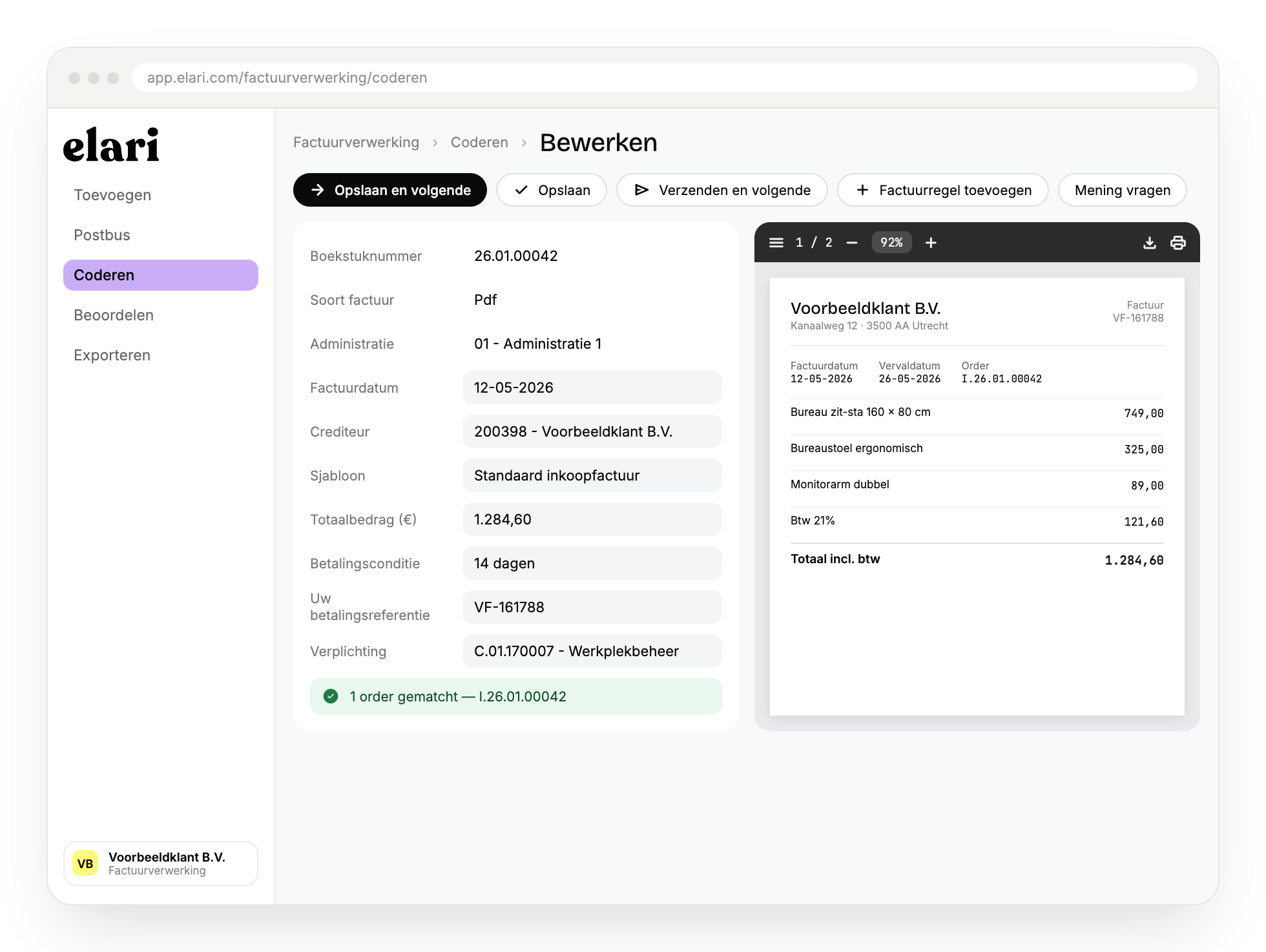
1. Receiving and Encoding

Elari processes scanned paper invoices, digital PDFs, and electronic invoices (UBL, XML, PEPPOL). Optical character recognition (OCR) automatically fills in the vendor, amount, VAT, and reference, and links the order directly to the invoice.
2-Elari Invoice Processing: Automated Workflows

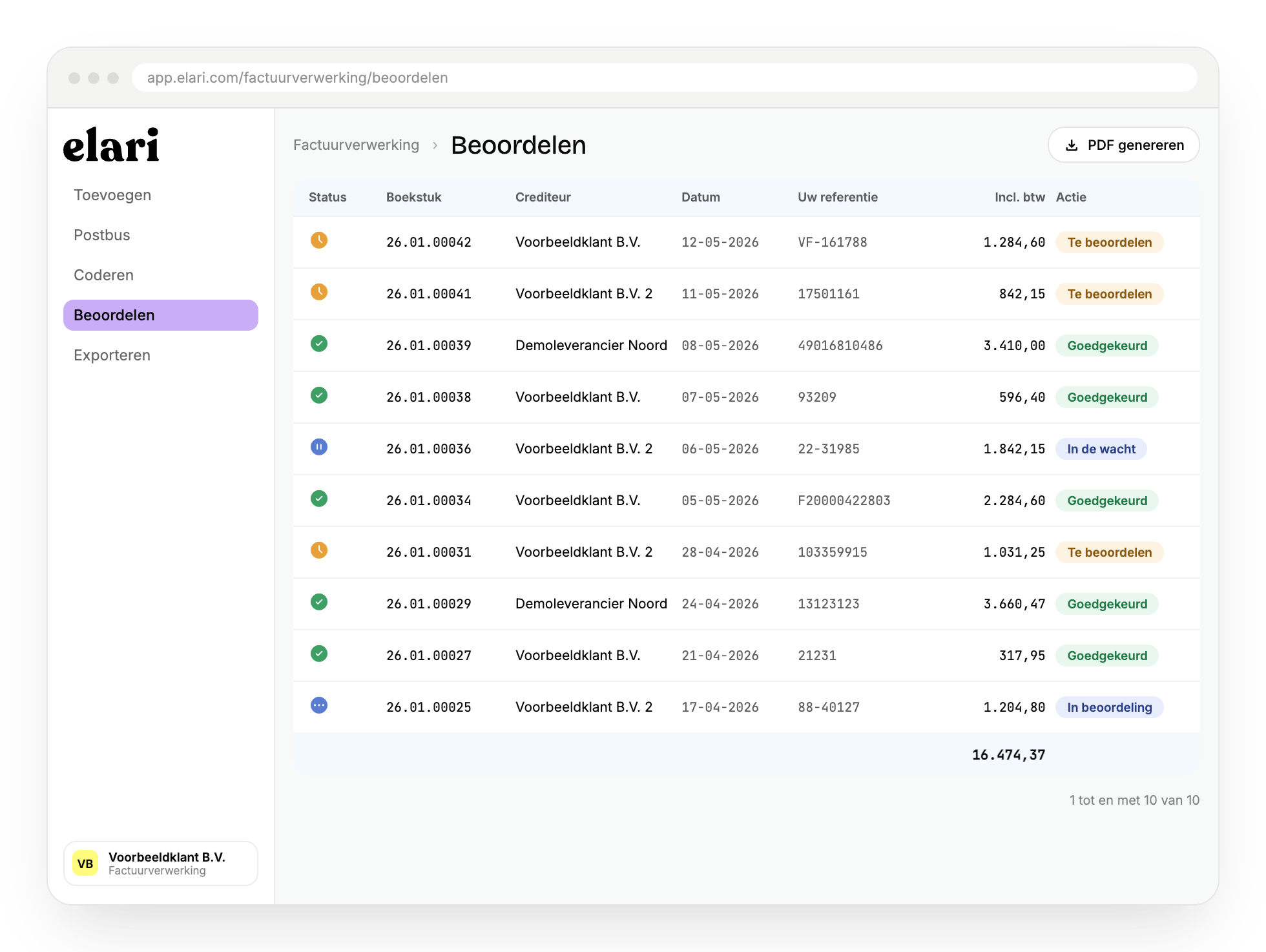
2. Automated workflows

The encoded invoice follows a preset workflow to the appropriate budget manager. Everyone involved can always see which invoices are awaiting approval, and reminders keep the process moving.

3-Elari Invoice Processing: Review and Pay

3 Review and Pay

After final approval, the invoice is ready to be exported to your accounting system and processed for payment. You select what needs to be included, and Elari takes care of the rest.

How a touchless process works in practice

A purchase order, the shipment, and the invoice are automatically compared. If they match, Elari processes the invoice without a manual review.


Elari_Invoice Processing

Invoice Processing

Invoices are automatically recognized, coded, and processed.

Elari_Contract Management

Contract Management

Contract terms and obligations are automatically monitored.

Elari_Purchasing

Purchasing

Orders are automatically matched with shipments and invoices.

Elari Community Illustration

Curious about the rates?

On our pricing page, you'll get an immediate estimate of the costs specifically for your organization.

Frequently Asked Questions

Here you'll find answers to the most frequently asked questions about invoice processing with Elari.

OCR stands for Optical Character Recognition: the technology that automatically reads invoice data and converts it into editable data. Elari goes beyond traditional OCR with AI-driven data capture technology that works regardless of how the invoice is received—whether uploaded manually or received automatically. Together with Autosuggest, invoices code themselves.

You determine in advance who is authorized to approve which invoices—for example, based on department, project, or amount. As soon as an invoice comes in, it is automatically sent to the right person, who can approve, reject, or forward it with a single click, either on a computer or via the app.

With 3-way matching, Elari automatically verifies whether the purchase order, the recorded delivery, and the invoice match each other. If they do, Elari processes the invoice fully automatically, without any manual verification. This enables touchless invoice processing.

Yes. Elari automatically integrates with over 40 accounting and ERP systems, including AFAS, Exact, Twinfield, Visma.net Financials, and AccountView. A customizable integration is also possible with other systems.

Invoice processing focuses solely on the automatic coding, approval, and processing of invoices. Purchase to Pay combines this with Procurement and Contract Management, so that purchase orders and deliveries are also automatically included in the verification process. This makes the entire process—from order to payment—touchless.

We take the security of your data seriously. We hold certifications such as ISAE 3402 Type II and ISO 27001, use secure connections, and conduct ongoing testing of our software. You can read more about security on our cybersecurity page.

Discover automated invoice processing

Save time and discover a completely touchless process. Schedule a no-obligation demo or download the fact sheet right away.
Theme Illustration 01 - Invoice Processing@2x-100-1